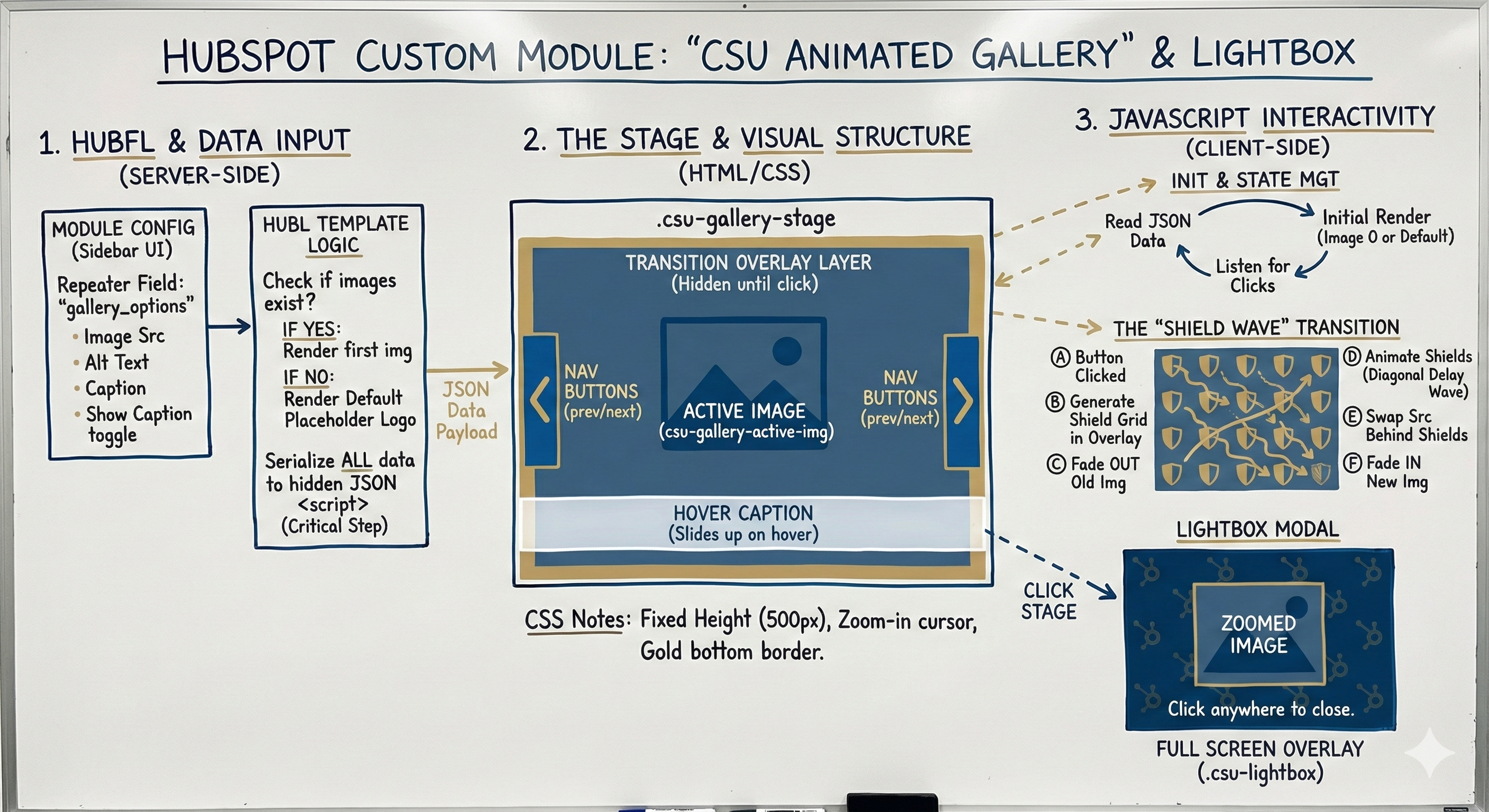
Executive Summary: We have successfully launched a visually stunning, brand-immersive Photo Gallery experience that significantly elevates how we showcase imagery on the site. This new feature moves beyond standard slideshows by integrating a unique "Shield Wave" animation, transforming every image transition into a memorable brand touchpoint that delights users and encourages interaction.
This update replaces static, generic photo layouts with a dynamic and polished interface. It is built to be completely "fail-safe," ensuring that even if content is missing, the page maintains a professional appearance using our official branding. The design automatically adapts to any screen size, providing a seamless and high-end experience whether the visitor is on a desktop computer or a smartphone.
Pro Tip: Visual storytelling is powerful! We designed this gallery to automatically hide the text overlay if you don't enter a caption. This means you can let your high-quality photography speak for itself without empty boxes cluttering the view.
Key Features & Enhancements
- Signature "Shield Wave" Effect: We created a custom animation where a wave of miniature CSU shields cascades across the screen when switching photos, reinforcing our brand identity in a fun and modern way.
- Theater Mode (Lightbox): Users can now click on any image to expand it into a full-screen view. This "theater mode" features a custom background pattern, allowing visitors to appreciate the fine details of our photography without distractions.
- Smart Hover Captions: Text descriptions are tucked away to keep the design clean, elegantly sliding up only when a user hovers over an image to read more context.
- Automatic Brand Protection: If an image is accidentally deleted or fails to load, the system instantly detects the error and displays a polished CSU logo placeholder, ensuring the website never looks broken.
- Touch-Optimized Navigation: The gallery includes large, easy-to-tap buttons and optimized layouts for mobile devices, making it effortless for users to swipe through content on their phones.